MultiAgent Systems
I guess I’ve got some reading to do…
My Best Technical Books
I have well over a hundred technical books. I use most of them and like many of them that are not on this list, but this list consists of the few that I revisit much more than others. These books may have an important idea in them that I use regularly in my work, or they may be of a reference sort that I refer to frequently.
I might not like all of the book or agree with the author on all points. However, if there’s a gem of an idea in there then I want to use it.
This is the list of those 22 favourite books. As I was making up the list I realized that there are several important “honourable mentions”. Perhaps that will be a posting for another time, though I will mention a few here and there.
As I complete the list below and look back over the books, I realize that most of them have a common theme to them, though this was not obvious to me as I constructed the list. If you remove most of the language specific books from the list (but even then keeping most of them), you’ll notice that all of the books in some way extract common patterns of importance to their subject area. Some are clearly written for this purpose (“Design Patterns”) but others do this as part of an agenda along the way (“Extreme Programming Explained” describes important patterns in a software development process, but really wants to promote Extreme Programming).
The ability to explain the common patterns clearly is probably why these books are on my list, now that I think about it.
Project Management and Estimation
Project Management and Software Estimation are hard, despite what the latest fad in either of these areas hawks. There’s no end to the theories on how things should be done correctly and generally my experience has been that software people (including myself) are poorly trained in this area. We have to learn by doing, making mistakes, mentoring with people we know and reading solid material.
There are many other good books like “Rapid Development” and “Software Project Survival Guide” that aren’t on this list. Those two are part of my honourable mentions.
Software Project Management, by Walker Royce
Addison-Wesley, 1998, ISBN 0-201-30958-0
This book is a great foundation in how a software project should be structured overall. It tends to avoid the process based questions (agile, spiral, waterfall, etc) and instead focuses on where your major milestones are, what you need to pay attention to in those milestones and who you need to answer to when you’re running your project.
A Guide to the Project Management Body of Knowledge (PMBOK) Third Edition, by The Project Management Institute
Project Management Institute, 2004, ISBN 1930699-45-X
Software projects have some unique aspects to them, but when you step away from the technology all projects run according to common principles. You have issues of risk, cost, quality, scope, communications and several more. These core principles are discussed in the PMBOK and you are provided with a standardized process for dealing with them. It needs to be customized for your department and project (see the previous book), but this book is essential to remind you of all the parts of a project of which you should be aware.
Function Point Analysis, by David Garmus and David Herron
Addison-Wesley, 2001, ISBN 0-201-69944-3
Function Point Analysis (FPA) isn’t very popular anymore. We have moved on from our COBOL days when everything was done with database queries to mainframes. Then again, have we? Is a web application connected to a database really that different at a high level? Are two layers of software talking to each other all that different from a request/query based system? (I just threw those in to stir the pot.)
Whether to use FPA or Source Lines of Code (SLOC) count is a point of endless religious debate. Personally I think that both approaches are flawed if you apply them from a purist perspective. I do like the FPA principles of responsibilities and relative difficulty as assigned to code blocks, since they seem more natural (and estimatable) to me. I use a responsibility/difficulty approach for my software estimates and so often refer back to this book for core principles.
Software Development Process
Software seems rife with hard nosed positions and heated debates. I believe that what software development process to use is the most heated of all of them by far (just in front of what computer language to use). In reality, different software development processes have their advantages and disadvantages, but these differences are not as stark as they may seem. Often very fine points of detail are wrongly made out to be of infinite importance.
That being said, as with the previous section, all software development processes have a core of commonality to them. The books in this section do support a specific process, but they do a good job of touching on the commonality of processes as well.
The Unified Software Development Process, by Ivar Jacobson, et al.
Addison-Wesley, 1999, ISBN 0-201-57169-2
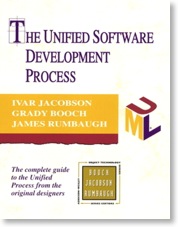
This book came out as part of the trilogy of UML books by the three amigos (Booch, Rumbaugh, Jacobson) when UML was first being presented to the public on a large scale. Each amigo took an area of expertise for the books but they collectively worked on the trilogy. Jacobson took the process part, probably because of all his overall work on Object Oriented Software Engineering (OOSE), whereas Booch and Rumbaugh tended to focus more on design (classes and domains, respectively).
I like this book because it demonstrates a novel, scalable way of describing a software development process. It uses a lot of pictures, which is very important to me because I am big on clear visualization. It is scalable because you can describe your process in broad brushstrokes, or go down to infinite detail, like the Rational Unified Process (which derives from this book and is similarly scalable in it’s own way).
You can even abandon the process entirely and use the notation to describe any software development process, a feature I have used more than once in my career.
Extreme Programming Explained, by Kent Beck
Addison-Wesley, 2000, ISBN 0-201-61641-6
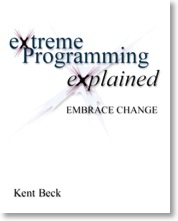
You always know where Kent Beck stands. I haven’t ever heard him present, but I don’t get the sense that he’s a subtle guy. This book was written in the early days of XP and can be at times heavy handed and evangelistic.
That being said, this book is very good for reminding you of what is important when developing software. Clear lines and basic principles. For example: “you have to deliver regularly”. Not “you have to deliver at the end of the project” or worse “you have to deliver sometime”. This is a reminder to structure your work so you can deliver. Project can forget this and find it difficult to deliver at the end.
I turn to this book when I need to be reminded of the essence of a process. You must deliver well. You must clearly show progress. You must define something clearly so you can clearly complete it. You must communicate that. This book reminds you to think of those issues and more.
Beck’s solution to these problems is the implementation of XP. Whether or not to use XP is not a simple matter, but Beck’s explanations of the principles are well done. I use this book to remind me of those principles.
Test Driven Development, by Kent Beck
Addison-Wesley, 2003, ISBN 0-321-14653-0
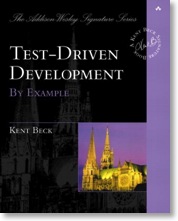
Another Beck book. Test Driven Development (TDD) is pretty much a gussied up version of more traditional testing techniques, a skein that makes it look more “Agile” than before. If you include unit testing as an important focus in your software development, you’re probably doing a lot of TDD already.
This book does a good job of reminding me how to think about testing properly. It is not enough to write code for two weeks and then toss off a couple of five line unit tests (not that I ever did that, but you get the point). Rather you need to think about testing as integrated in with your software, because it is your software. If you ignore testing then all the follow-on ugly details (like delivering) get a lot uglier.
I usually don’t have to go back to this book much but I often recommend it to people to highlight these principles.
Requirements
There are many ways to write requirements: requirements statements, use cases, user stories, wireframes and so on. Ultimately, they all aspire to achieve the same thing: describe a goal. The books in this section aren’t really exclusively about use cases, they’re about how to describe a goal (requirement) well.
Use Case Driven Object Modeling with UML, by Doug Rosenberg with Kendall Scott
Addison-Wesley, 1999, ISBN 0-201-43289-7
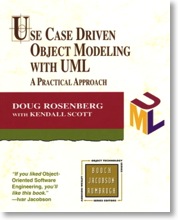
This book served as my first introduction to Robustness Analysis which was developed by Jacobson. Once I saw it I now almost exclusively design my architectures using Robustness Diagrams. It is so much a part of my thinking that I’m not sure I can imagine an architecture in a different way anymore, even when I’m not using use cases. This book has also strongly affected my practice of software estimation, in combination with “Function Point Analysis” mentioned earlier and “Software Reuse” mentioned later.
It also has the benefit of answering the question “How can I do a use case based implementation?” in about 150 pages. It’s not a perfect answer, but it’s a pretty good one.
Patterns for Effective Use Cases, by Steve Adolph, et al
Addison-Wesley, 2003, ISBN 0-201-72184-8
What do you need to pay attention to when writing requirements, in whatever form you prefer? This book answers that question.
Here’s an example from the book: “Developing use cases [or requirements] in a single pass is difficult and can make it expensive to incorporate new information into them. Even worse, it can delay the discovery of risk factors.” The section then goes on to explain this axiom and what it means for your project. It covers everything from developing the requirements team to the nuts and bolts of writing a requirement.
I refer to this book often to be reminded of these principles when writing and reviewing requirements.
Architecture
Software Architecture is a funny thing. There seems to be a lot of “magic” around architecture, with the stereotype of people who say things that on the surface sound reasonable but which quickly fall apart under direct inspection.
Ok, so I’m being flippant.
I do have major concerns about the way we describe architecture, though. As an industry, we’re not clear about architecture. We don’t do enough of it in the right places. We don’t describe it in a way that mere mortal developers can understand.
For me an architecture needs to be clear and understandable. It does not need to be simple, but great care should be taken to avoid unnecessary complexity. These books help me work towards those goals.
The Art of Systems Architecting Second Edition, by Mark W. Maier and Eberhardt Rechtin
CRC Press, 2000, ISBN 0-8493-0440-7
This book does the best job I’ve seen of explaining how to do a view-based architecture. There are other books that profess other types of views, but I like the clarity of the ones in this book. Better yet, I can explain the views to people in a few minutes and they get it. It doesn’t profess any particular process or notation, which means it can be easily customized.
Software Reuse, by Ivar Jacobson, et al
Addison-Wesley, 1997, ISBN 0-201-92476-5
I found this book after reading “Use Case Driven Object Modeling with UML” in the Requirements section. It goes into more detail how to do Robustness Analysis, which makes up a major portion of how I describe architecture. It also shows some key diagrams that explain how use cases translate into classes, but can be generalized into any kind of requirement. It promotes a responsibility-based approach to design.
The Algorithm Design Manual Second Edition, by Steven S. Skiena
Springer-Verlag, 2008, ISBN 978-1-84800-070-4
This is the newcomer to my “best” collection. I have only used it a little, but I really like what I have used. This book is an encyclopedia of sorts, divided into three sections. I use all parts of the book differently.
The first section describes common algorithm areas (Sorting and Searching, Graph Theory, Heuristics). The text is a little dry but keeps the hard lingo to a minimum. I use this to research an approach or technique.
The second section is tiny, but very helpful. It contains three pages of questions you should ask yourself when designing a new algorithm. It is very to the point and asks you hard questions. If you can’t answer these questions then you don’t know how to design your algorithm. This is very helpful and not to be underestimated.
The third section is a gold mine catalogue of problems. You find yourself with a problem. How do you solve it? If you generally know the algorithm area (from the first section), you can browse the problems, and the book will point you to particular algorithms and warn you of pitfalls. This section uses a bit more lingo and makes you work somewhat, but the rewards are finding an approach to solving your problem.
Design
I think I can safely claim that software is awash in design books. I’m looking at my shelves right now and I see a lot of them. Perhaps design is the most written about area of software, aside from programming languages themselves. When I separate the wheat from the chaff I get the following books.
Design Patterns, by Erich Gamma, et al
Addison-Wesley, 1995, ISBN 0-201-63361-2
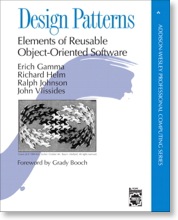
This book has a lot of problems. The examples aren’t at all clear sometimes. You have to read something three times to figure out what the authors mean and even then sometimes you’re not sure.
That being said, when I want to know about a pattern, I open this book. When I need to understand the risks of the Visitor pattern, for example, I open this book. When I need to figure out how one pattern compares to another, I open this book.
So, despite all it’s flaws, this book is on this list.
Pattern Oriented Software Architecture, by Frank Buschmann, et al
John Wiley & Sons, 1996, ISBN 0-471-95869-7
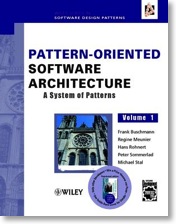
Instead of design patterns described in the previous book, this book describes architecture patterns (or design patterns at the architecture level). For example, the Model View Controller (MVC) pattern is covered in this book. It’s well written and I open it as much as I open the design patterns book.
There is an excellent second volume on concurrent and network objects, but I don’t use it as much so it’s not on the list.
Real Time Design Patterns, by Bruce Powel Douglass
Addison-Wesley, 2003, ISBN 0-201-69956-7
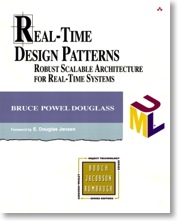
This is turning into a repetitive, eh, pattern. This book covers design patterns for real time software. If you need to know anything about resource management, locking, concurrency and so on, this is the book for you.
It also has value anywhere you need to deal with shared resources, even if your software isn’t real time.
Refactoring, by Martin Fowler
Addison-Wesley, 1999, ISBN 0-201-48567-2
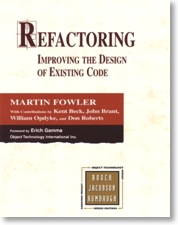
Refactoring has pretty much entered the common software vernacular. It’s the process of reworking existing code to a set of principles. Those principles might be lowering coupling and increasing cohesion, reworking interfaces, or anything that needs cleanup. The book does have a second section with respect to specific types of refactoring problems and how to fix them.
However, for me the most valuable section is the first part of the book that deals with the principles of refactoring and the things you need to consider whilst you are doing this. We all refactor in our jobs. This book reminds me how to do that more effectively. I also tend to dip into this book to read a random section for a refresher.
Prefactoring, by Ken Pugh
O’Reilly, 2005, ISBN 0-596-00874-0
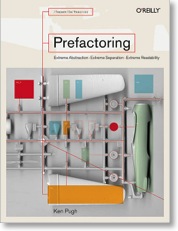
I stumbled across this neat little book purely by accident. Prefactoring is the act of constructing a design so it will evolve well in the future. Or, I suppose you could say prefactoring is designing so in the future it is easy to do refactoring. It covers three areas called “extreme abstraction”, “extreme separation” and “extreme readability”. These three areas have short statements reminding you of a certain principle, like “Figure out how to migrate before you migrate: Considering the migration path might help you discover additional considerations in other areas of the design”.
This book is written for the beginner designer. This is the book I wish I was given when I started designing. I recommend it for every person starting in design.
I use it to remind myself of important things. I tend to dip into it by opening a page randomly or reading a section based on what I’m doing right now. Sometimes we forget basic principles. My friend Dan always says “Make it work, then make it better.” Pugh similarly concurs: “Get something working: Create something basic before adding refinements.”
The following sections cover books for specific languages. In some cases they teach essential principles that transcend the language. This makes them doubly valuable. There isn’t a lot to say about these books, though. They tend to be need-specific.
Language: C++
Effective C++, by Scott Meyers
Addison-Wesley, 1997, ISBN 0-201-92488-9
Meyers talks a lot about the pitfalls of C++, but much of this is important for implementing in any object oriented language.
The C++ Standard Library, by Nicolai M. Josuttis
Addison-Wesley, 1999, ISBN 0-201-37926-0
Contains clear information on the arcane area that is the Standard Template Library (STL). There’s lots of dragons here, which you discover once you wield the STL. This book helps you slay them.
C++ Templates, by David Vandevoorde and Nicolai M. Josuttis
Addison-Wesley, 2003, ISBN 0-201-73484-2
Templates in C++ are harder than I think they should be. Maybe it’s me, I don’t know. When I scratch my head because a template isn’t doing what I want, I open this book.
Language: Python
Python in a Nutshell Second Edition, by Alex Martelli
O’Reilly, 2006, ISBN 0-596-10046-9
I like having the greater part of Python in one book. My copy of this is pretty dog eared. I would have liked a better index, though. I’ve started annotating the index myself.
Language: C
The C Programming Language Second Edition, by Brian W. Kernighan and Dennis M. Ritchie
Prentice Hall, 1988, ISBN 0-13-110362-8
My oldest technology book still in use. (My oldest technology book not in use is probably a Commodore 64 book or the one on Xanadu.) The K&R is still in use because it’s still good. I can also find things quickly in it.
Technology: XML
XML in a Nutshell Third Edition, by Elliotte Rusty Harold and W. Scott Means
O’Reilly, 2004, ISBN 0-596-00764-7
I want to know about XML I look here. That’s about all there is to say.
I hope you’ve enjoyed reading the list. It was fun putting the list together and writing about all these great books.
If you have other favourites, feel free to send me a message about them.
Thinking about Data Types
In this article I want to discuss the types of problems that can appear around using data types. I also argue for some up-front planning when using key data types in your application. Finally, I introduce protobuf, the cross-language data type generator from Google.
Data types vary from language to language and implementation to implementation but they generally consist of the following variations:
- Simple types like integers (signed, unsigned, bytes, 16-bit, 32-bit, etc.)
- “Sort of” simple types like characters and strings (8-bit or unicode). I say “sort of” because “here be dragons” going back and forth between unicode.
- Enumerated types
- Collections of multiple types using keys (dictionaries and maps) or no keys (structures and unions)
- Arrays (multiple sequence of a specific type)
As long as you code in one particular language at a time, the language does the heavy lifting for you with respect to data types. You might need to spend a moment to explicitly define them (C++, C, Java, C#, Actionscript) or you might get away without defining them at all and let the compiler do it for you (Python, Lua). In all these cases you only need to worry about data types during edge conditions, like signed vs. unsigned conversions, bit manipulations, or math precision.
So generally data types don’t need to enter your awareness too much. This can lead to a, shall we say, “organic” growth of the use of data types in your application. That is, you create them as you need them while programming and may not necessarily plan out their long-term use. “Long-term” applies to data that has longevity in your application as opposed to temporary variables.
Problems occur when these data types need to be marshalled or unmarshalled. Marshalling is the process of converting types from one form to another (and unmarshalling converts them back), usually for transmission of some sort.
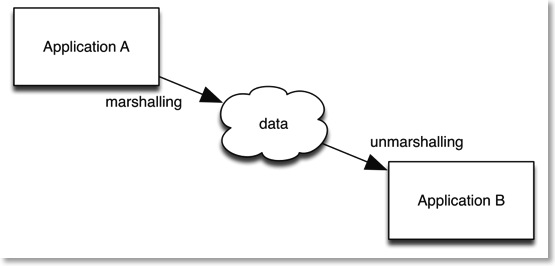
There are many examples of marshalling in regular programming:
- Saving and retrieving data to/from files.
- Communication boundaries between two languages. A very common example of this is the regular conversion between C++ and C-style strings. Other examples exist when connecting to a scripting language (like Lua scripting as an enhancement to applications like video games).
- Communication through pipes or sockets.
- Communication between processes or threads.
- Client/Server communication.
- Conversion to/from XML.
Marshalling is a messy process. It’s messy because you’re dealing with unprotected data from untrusted sources. The data is unprotected in that the compiler no longer has control of the data once it has been marshalled (turned into the cloud below). Normally a compiler prevents invalid data from being inserted into data types (depending on the language more or less protection).
The data is untrusted because once it crosses your application boundary you cannot know what happens to it in transit. If something happens to the data the unmarshalling process may not work and cause exceptions. Due to all this uncertainty, you need to build some form of verification into the unmarshalling process to make sure you have good data coming into your application.
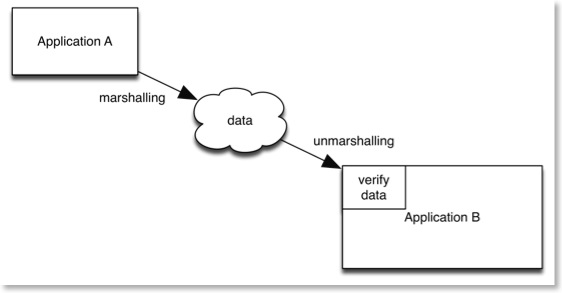
You also have versioning issues. You may decide to change the format of the data or add extra properties (for example, adding extra items to a dictionary). You then need to deal with the older format of the data which may exist in older deployed applications or files. Even if you intend to upgrade all these interfaces quickly there is still a transition period where you need to deal with two different formats.
There are many other problems as well:
- Endian issues deal with non-byte numbers being represented in a different sequence on different types of processors.
- Numbers may be different byte sizes on each side of the marshalling.
- Strings may only be 8-bit on one side of the marshalling and unicode on the other.
All of this highlights that you need a strategy for dealing with interface-critical data types. Some of this is handled through web services like SOAP or JSON, but these aren’t always available to you (or you may not wish to use them), especially when working with embedded applications.
A relatively recent alternative comes from Google. Protobuf (Protocol Buffers) is an open source language independent format for defining data types. A .proto file specifies the data types. Protobuf then generates the data types in the language of your choice.
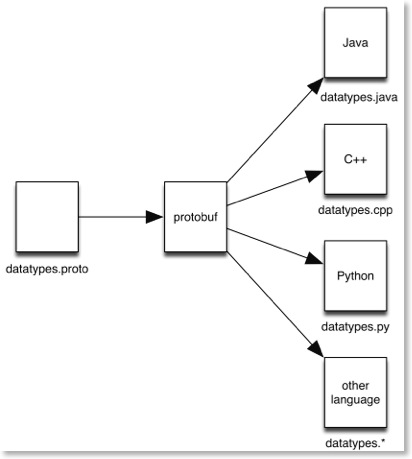
Protobuf officially supports Python, C++ and Java. There are a host of third party extensions for other languages, including C#, C, and Actionscript.
Protobuf features versioning as well as simple data verification during marshalling. The language independence ensures that you can write language independent data types and continue to use them should you need to expand into a different language in the future. The Google documentation has a good explanation on protobuf’s marshalling efficiency as well.
I encourage you to check out protobuf for your next project. It solves many problems you may have not known were there and would rather not encounter. You honestly do not want to build these things from scratch.
You have better things to do.
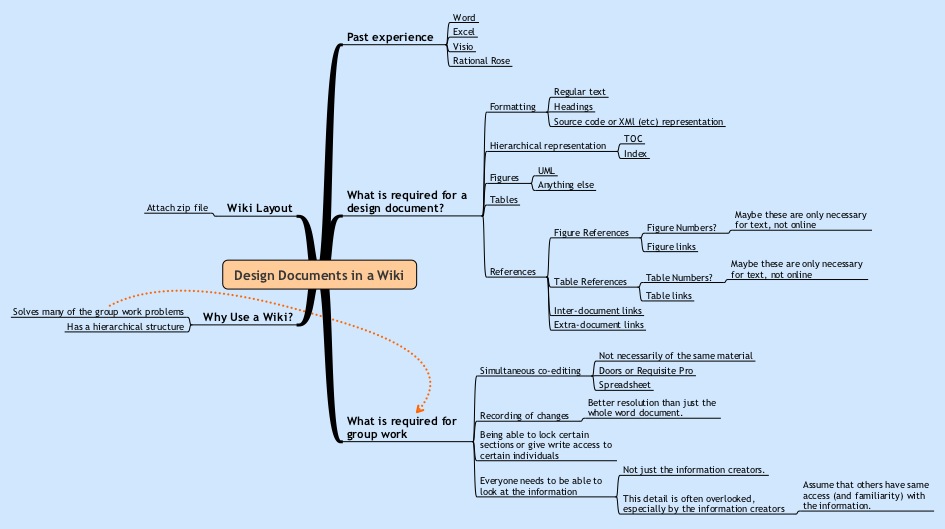
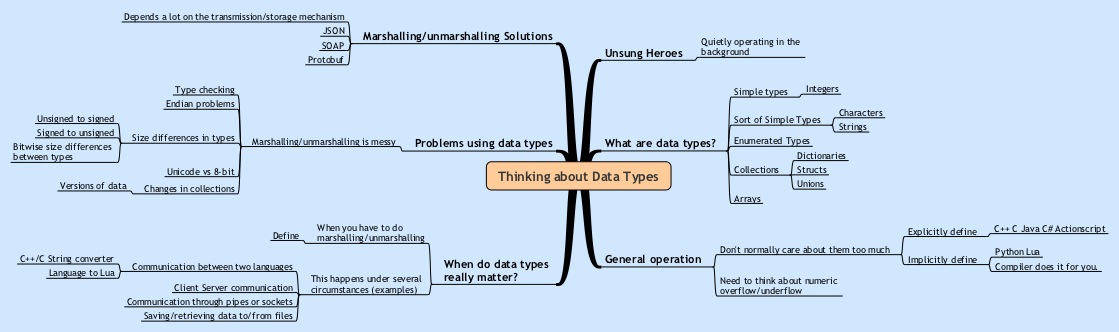
You may like to see the mindmap that was used to write the draft of this entry. Please click on the map below for a bigger picture.
Design Documents in a Wiki
I’ve usually written said documents using Microsoft Word. I’m a big fan of pictures for explanation, so I also make heavy use of drawing tools like Microsoft Visio (or OmniGraffle on the Mac) and IBM Rational Rose, Visual Paradigm, or a variety of other specialized modeling tools. I’ve even included the odd Concept Map and Mindmap where it served a good purpose.
I have a problem with documents, though. It’s something I’ve noticed that occurs several times in the software development world. I suppose this is a topic for an entirely different posting, but I’ll summarize it here. We all suffer from an abstraction problem. That is, we have specific needs for our creation tools, but our tools do not live up to our needs. Because our tools are so ubiquitous, we don’t necessarily even see that there is a problem, or we view it as something we can’t change and make do as best as possible. This is inefficient at best and can severely impact our projects at worst.
What do I mean by this?
The two examples I want to mention both suffer from our use of the file metaphor. Our operating systems work based on files, which is our smallest “unit of work” for working on our file systems. Files in the file system are exclusive units that only one person gets write access to at any one time. The first example I want to use is the problem we encounter when writing code in files. The moment we put more than one class in a file, we’ve created a problem when someone else wants to edit the classes in that file the same time we do.
For example, file X contains classes A and B. I’m editing class A and I have file X locked. If someone else wants to edit class B then they have to perform a variety of gyrations to get a copy of file X, edit it independently, and then merge their B with my A to fix things up. We see these actions as normal in software development, but all that’s happened is we’ve built complex processes and tools around fixing a problem with the metaphor we use (the file).
The second example is a document written in a word processor, which covers almost all the documents I’ve mentioned up until now. Here we have a single file representing the entire document. We can sometimes wiggle out of the code editing problem I mentioned earlier by doing more divide and conquer (like breaking up classes A and B and putting them into files XA and XB). This is not so easily done with documents. Word processors do allow you to split larger documents into smaller ones but they get cranky with you if you move the sub-documents around or modify them in unexpected ways. Once split (either by program or by hand) you require someone to put the document back together once various people have made changes to their sections.
So our first need is this: Is there some way we can break up a document into fragments to give us the same level of flexibility in divide and conquer as we can do with source code?
Assuming we can get this, we have several follow-on needs that get created.
The second need is: How do we keep track of everyone’s changes so we can undo them in a controlled fashion should we need to, or find our who has done what? Basically, this is very granular version control for each section of the document (however big you define a section).
The third need is: Assuming we can do all of this, how do we “compile” the separate document fragments back into something that is readable? I use the word compile here to draw an analogy to the file/code example. Although people do need to look at specific sections (classes in a file), there comes a time when you want to look at the whole thing (the program) and people more often than not want the entire thing.
The fourth need is: documents need to be completely accessible to anyone who should have the ability to read them. This sounds obvious, but document accessibility is often made far too inconvenient. Documents take a lot of time to write. This usually means that the drafts/incomplete documents are away on someone’s hard drive or otherwise inaccessible to the developer public. Another way of looking at this is that documents are often stored in a manner that is easy for the person editing the document, but inconvenient for the readers to view the document. Anything that makes a document inconvenient to read means that it will not be read. This must be avoided at all costs, else the cost is paid when the effort to create the document is wasted.
There are other typical word processing-like requirements as well. Roughly speaking, I will summarize this into my fifth need:
- formatting (regular text, headings, styles)
- hierarchical representation (table of contents. headings, index)
- figures (in whatever graphical formats you need)
- tables
- references (inter document links, figure references, table references, extra-document links)
So that’s the problem. After thinking about this for a while, I believe that we should move away from word processor based documents and move to something that can handle document fragments. I also believe that our best solution for this is a wiki.
I should note that I am using the open source MediaWiki software for the purposes of this article. MediaWiki powers Wikipedia and is straightforward to set up.
Now let’s take a look at how a wiki solves the needs I’ve mentioned before.
In the case of the fifth need, a wiki supports everything I’ve mentioned. Figures are usually imported as JPEGs, but this is the equivalent of the copy and paste we do with a word processor.
In the case of the second need, a wiki provides complete version tracking and, presuming you turn on the security, complete user tracking of changes. Developers can subscribe to see changes on different pages, or look at the built in change log to see what has been changed.
In the case of the fourth need, a wiki provides accessibility to the document at all times. Developers can mark a section as draft or not approved by writing this in the text itself. The changes are immediately viewable as soon as they are saved. Furthermore, each article has a discussion tab that allows commentary, todos, interpretation, questions, or whatever developers need for asking questions about a specific section. This is best done here rather than e-mails because then the information is available to all people and is not lost in the huge e-mail boxes we all accumulate.
Needs one and three require something extra, which makes up the rest of this article. But first, we need to cover a feature of wikis that isn’t well known.
If you’ve ever edited a wiki article, you will know that you can link to other articles using the [[article]] reference notation. So, if I am editing “Article A” and I wanted to reference “Article B”, I would put the following notation in the code:
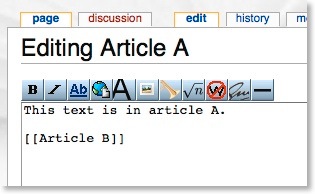
Which would then appear as follows when viewing it:
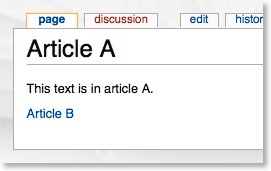
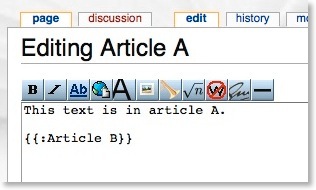
What’s less well known is the {{:article}} notation, which is intended for templates. This notation includes the text of the referenced article directly into the article you are viewing. If I am editing “Article A” and I wanted to include “Article B”, I would put the following notation in the code:
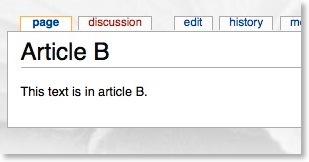
Let’s say Article B contains:
Using the notation mentioned, Article A now appears as follows when viewing it:
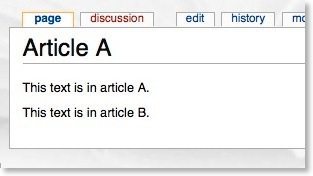
This feature is simple so the power of it (and the relevance to this article) might not be immediately obvious. This wiki “include” feature (called Transclusion) provides everything needed to satisfy our third need. That is, we now have the ability to make document fragments and weave them back together into an entire document. Furthermore, this capability is hierarchical, which satisfies the first need. The hierarchical feature allows us to break up a document to any level of resolution for editing and maintenance capabilities, yet allows complete viewing of the document in its entirety.
Below is an example of a HLD using this technique. I personally like the HLD structure as described by Maier and Rechtin in “The Art of Systems Architecting”. Using that as a guide I’ve created the structure below.
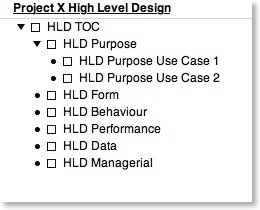
Each of the top level sections gets its own subsection in the wiki, named based on the previous diagram. You can use any naming system that works for you. Using that as a style, this is then the wiki entry for the top level of the HLD (called “Project X High Level Design” ):
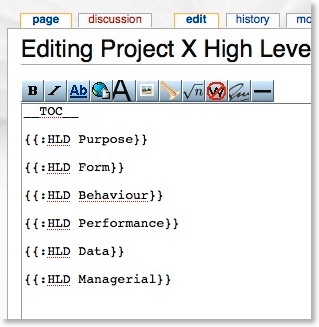
Assume that I populate all of the subsections with content. The top level of the HLD now appears as follows when viewing it:
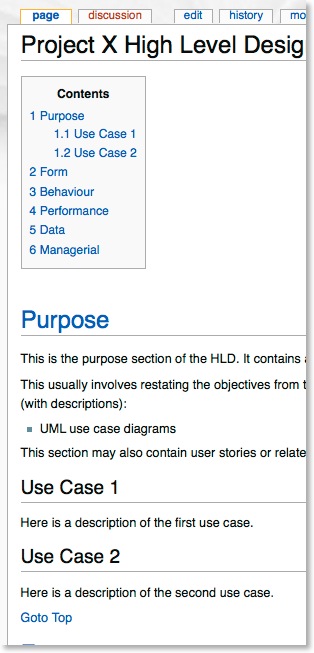
Assuming I print it as a PDF (using the “printable version” feature that comes installed in the wiki) I get a document you can view by clicking here.
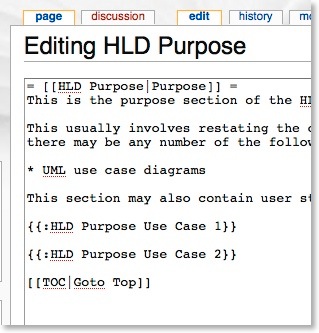
You can see a nested include in the Purpose section:
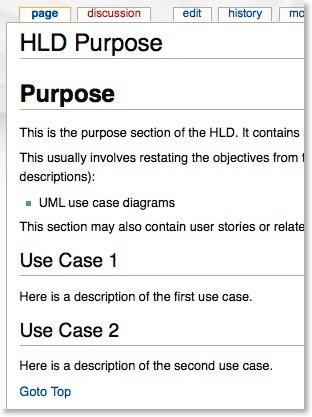
If you edit the purpose article:
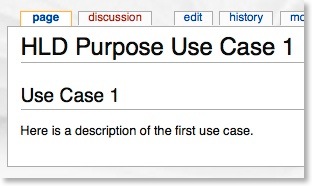
If you drill down further to the first use case you can see more about how the hierarchy works.
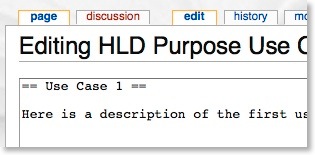
If you edit this use case:
The complete contents of all wiki articles used for this page may be seen by clicking here.
The benefit of having a document set up in such a way is you only need to divide the document into smaller subsections as needed. The more people working on a particular area, the more granularity you need in that area. You do not need to plan this in advance and can gradually break the document down into smaller and smaller articles as your project grows. As you break the document down, you have a complete audit trail every step of the way as provided by the wiki software.
I’d appreciate you letting me know what you think of this technique.
You may like to see the mindmap that was used to write the draft of this entry. Please click on the map below for a bigger picture.