


Using the Unix System V Semaphore as a Mutex
There may come a time in your career where you are forced to use the System V semaphores. This came for me recently where I couldn't use the POSIX semaphores nor the pthreads semaphores due to incompatibilities with the kernel I was using. So, I pulled out the old warhorse System V semaphore that I haven't used in a very long time.
Personally I think that the System V semaphores were invented to torture mere mortal developers. They are all-singing-all-dancing semaphores that can do any combination of counting that you like, if you could only figure them out. I just wanted a simple mutex semaphore.
Briefly speaking, mutex semaphores are binary semaphores. They can be locked or unlocked. If the semaphore is unlocked then a process that tries to access them is granted access and "controls" the semaphore. If the semaphore is locked then the requested process is blocked until the controlling process unlocks the semaphore. With this you can get exclusive access to a resource, like shared memory.
I have created a test file that you can use to play with the semaphore. Download semtest.c. You can then compile and run the file in separate processes and test the semaphore by locking and unlocking it by blocking different processes.
The rest of this posting explains the use of the semaphore.
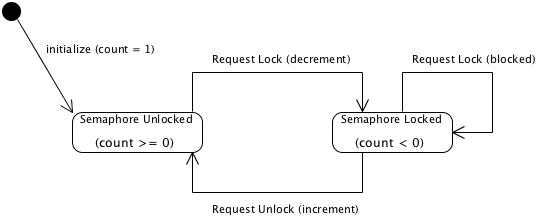
To use a System V semaphore as a mutex, you need to do the following steps. Refer also to the state machine below:
- Create the semaphore
- Initialize the semaphore to one (1) to put it in the unlocked position
- To request a lock (grant exclusive access to your resource), decrement the semaphore count
- To request an unlock (release exclusive access to your resource), increment the semaphore count.
Creating the semaphore
To create the semaphore, you need to perform the following steps:
- create a file in the filesystem to hold the semaphore
- set up a token to the file
- create the semaphore itself
The code to do this is:
//---------------------------------------------------------------// create a file in the filesystem to hold the semaphore//---------------------------------------------------------------// create a filename in a char* “buffer” (see semtest.c for full details)if (( theMutexSemFile = open(buffer, O_CREAT|O_RDWR, S_IRWXU|S_IRWXG|S_IRWXO)) == -1){ printf("theMutex file open problem: %m\n");}//---------------------------------------------------------------// set up a token to the file//---------------------------------------------------------------// Semaphore ftok() ID parameter used between the interface and agent.#define SEM_KEY_ID 0x01// Open the file token for the semaphoretheMutexSemToken = ftok(buffer, SEM_KEY_ID);if( theMutexSemToken == (key_t)(-1) ){ printf( "ftok failed: %s (%d)\n", strerror(errno), errno );}//---------------------------------------------------------------// create the semaphore itself//---------------------------------------------------------------// Configure the semaphoretheMutexSem = semget( theMutexSemToken, 1, IPC_CREAT | 0666);if( -1 == theMutexSem ){ printf("Semget failed - %s (%d)\n", strerror(errno), errno);}
Initialize the semaphore to one (1) to put it in the unlocked position
The default semaphore count is zero. This will create an immediate deadlock if you request a lock, when you want the first process to get the semaphore when you request it. To set it to one, use the following code:
int initialSemaphoreValue = 1;if( -1 == semctl( theMutexSem, 0, SETVAL, initialSemaphoreValue) ){ printf("semctl failed - %s (%d)\n", strerror(errno), errno);}
To request a lock (grant exclusive access to your resource)
Once the semaphore is set up, the process decrements the counter to set the lock. The first process gets in “free” because the counter is set to 1. It must be set to 1 so the first process is not blocked on the first request, creating a deadlock situation.
Once the first process requests a lock, the request decrements the counter so it is set to zero. Technically the semaphore is not yet locked. When a second process requests a lock, it will decrement the counter again and lock because the counter has transitioned to -1.
The code to decrement the semaphore is below:
theMutexLock.sem_num = 0;theMutexLock.sem_op = -1;theMutexLock.sem_flg = 0; // lock the semaphoreif( 0 == semop( theMutexSem, &theMutexLock, 1 ) ){ printf("theMutex lock successful: %m (%d)\n",errno);}else{ printf("theMutex lock fails: %m (%d)\n",errno);}
To request an unlock (release exclusive access to your resource)
The process increments the counter to set release a lock.
The code to decrement the semaphore is below:
theMutexUnlock.sem_num = 0;theMutexUnlock.sem_op = 1;theMutexUnlock.sem_flg = 0; // unlock the semaphoreif( 0 == semop( theMutexSem, &theMutexUnlock, 1 ) ){ printf("theMutex unlock successful: %m (%d)\n",errno);}else{ printf("theMutex unlock fails: %m (%d)\n",errno);}