


Python Factories
That principle doesn’t always work well when you run into issues of scale. Maintainability starts to break down at those stages and a different implementation is needed.
I’ve been writing an open source codegen framework to address those issues. In this article I want to talk about the Factory class I use for the framework. It also happens to be a versatile Factory class that you can repurpose for anything else you happen to be writing in Python.
First, a quick reminder of what goes into a Factory implementation. The Gang of Four book describes the “Factory Method” design pattern as a mechanism for creating an object where the subclasses decide how to instantiate the class. In this way you can feed in data of your choosing and get out an object that was created based on that data.
In my codegen framework, I store the data in XML. Each XML node contains some portion of the codegen information and you need to perform a variety of activities at each node level. Using the car alarm example from my codegen page, there are several levels of nodes as shown in the diagram below. The codegen needs to act (and generate different types of code) at each level.
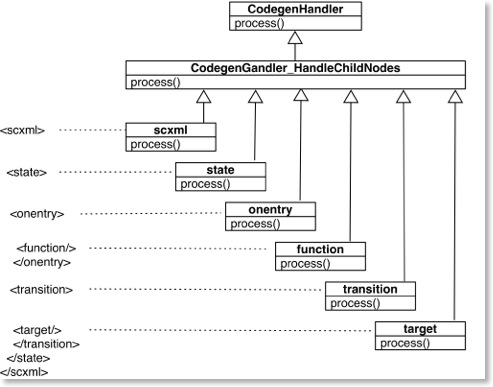
You may recognize this description as an implementation of the strategy pattern. In this way you can perform custom implementations with a minimal amount of overhead.
Factories need to be able to instantiate objects based on some criteria. They then return custom objects that the client can use. The implementation of this part of the Factory is very important from a maintenance perspective. If you have a small amount codegen then you can get away with a simpler implementation. In this article I argue for a more generic implementation so you don’t have to worry about issues of scale afterwards.
Example Files
Please download the example file codegenExample.py to provide an example for running the Factories. I also have created an example using the Car Alarm scenario from my codegen page. This may be found in the file stateExample.py. You will also need the car_alarm.xml file to run it.
Simpler Factory using Dictionaries
The first example in the codegenExample.py implements a factory using a dictionary (the implementation is in codegenUtilitiesWithDictionary.py). The name of the XML node is tied to a class. When this XML node is reached, the Factory returns an object based on the matching class.
The easiest implementation in Python is to create a dictionary where the key is the XML node name and the value is a reference to the class (shown below). This code is from the SampleCodegenPhaseWithDictionary class in codegenExample.py.
nodeLookup = { 'aa' : CodegenHandler_Node_Sample, 'ab' : CodegenHandler_Node_Sample, 'ba' : CodegenHandler_Node_Sample, 'bc' : CodegenHandler_Node_Sample, 'cb' : CodegenHandler_Node_Sample, 'cc' : CodegenHandler_Node_Sample, }
This implementation has the advantage that the lookup table is in one place and you can incrementally add classes as necessary as your codegen grows.
I’d argue that this isn’t the best implementation though.
A problem is created as you add more classes to your codegen. You have to remember to keep going back to this lookup table and updating it. It may not sound like a lot of effort but it can be easily forgotten. Another factor to consider is the use of phases, which I will explain in another article. The relevant point right now is that for each phase you need another set of classes for each of the XML nodes. I use 4 or 5 phases in my codegen, so I need 4 or 5 sets of classes and the same number of dictionaries.
Going forward in the maintenance schedule, the likelihood that I (or others) will forget to hook up the classes in the dictionary are pretty high.
But what if Python could do this for you? The answer is that it can.
Factory with Automatic Class Lookup
This second example codegenUtilitiesAutomatic.py uses a slightly different Factory. This Factory takes advantage of Python’s introspective capabilities and builds the list of classes automatically. The dictionary isn’t needed and so there aren’t any possibilities of hookup errors.
I learned this trick from my colleague Kevin, who learned it from the Lex/Yacc implementation in Python.
Basically, you raise an exception and immediately catch it. The traceback frame from the exception includes a snapshot of the globals() namespace. The globals() namespace is a dictionary matching the name of the classes available with a reference to the class. That gives us all the information we need to duplicate the dictionary from the simple Factory above.
One small catch, though. The traceback frame is nested, so you need to get the proper parent frame so you can access the right globals() namespace, otherwise you won’t be able to lookup the classes.
I’ve written a custom exception for this purpose in the codegenUtilitiesAutomatic.py file:
class CodegenException(Exception): "General error during the codegen processing." def __init__(self, *args): Exception.__init__(self, *args) self.wrapped_exc = sys.exc_info()
When an exception is raised, the traceback frame will point to the exception. The exception is contained within the Factory, so the factory is the parent traceback frame. The codegen classes are one level above that, so you need to go through two parent traceback frames to get at the globals() namespace for the classes, as shown below:
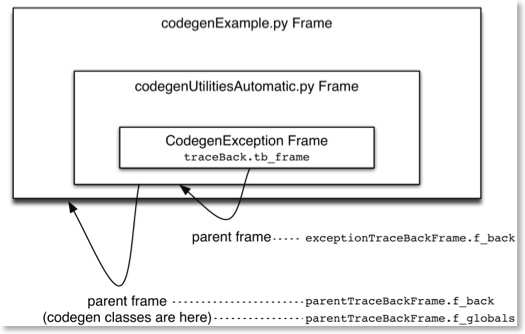
The code to do this in the Factory:
try: raise CodegenException except CodegenException: # Get the traceback information for the exception namespace (ignore , ignore, traceBack) = sys.exc_info() exceptionTraceBackFrame = traceBack.tb_frame # Get the traceback information for the codegenUtilities parent parentTraceBackFrame = exceptionTraceBackFrame.f_back # Get the traceback information for the codegen parent parentTraceBackFrame = parentTraceBackFrame.f_back # Save the parent's globals() namespace that contains the list of # classes that can be used by the factory. self.nodeLookup = parentTraceBackFrame.f_globals
The benefit from a maintainer perspective is that you don’t have to know about any of this. As you add classes to expand your codegen you don’t have to touch any of this and it is flexible enough to handle any changes you might make.
I recommend taking a look at the examples I mentioned before. They will show you how this code works and hopefully gives you some ideas about how it can be repurposed for many other purposes.
State Machine Codegen in Actionscript 0.2
This is a v0.1 release. It provides all the features supported in my other languages, but I’m thinking that I want to add support for additional features.
- I’ll probably add onexit() capability. That’s pretty easy to add.
- I’m debating about do() functionality. This is an internal action that executes continuously inside the state. I’m normally not a fan of this capability for several reasons. The two significant downsides is that the do() feature takes away the event driven characteristics of the design. After all, if you’re using a state machine you’re probably doing something with events. The second downside is that Actionscript is single threaded (or run-to-completion, if you prefer). Coded poorly, single threaded applications can be quite unresponsive. In its favour, Actionscript has an event handling system (see next point) and good timer support. So, I might implement a modified do() that operates with timers, rather than continuously.
- Actionscript has a nice event handling system. I haven’t integrated the event handling system into the state machine model yet. This is because some implementations might not want to use the event handling system. However, I think I will write a code generator to wrap the events so the state machine then responds to events. That way you can use either implementation as you please.
So those are the extra features I am considering. I may also need to add more hand crafted code sections into the state classes, but that will come out as I start using the implementation more.
If you try out the code, please send me an e-mail to let me know what you think. I have embedded a flash version of the code below.